




6 devices to boost your home Wi-Fi signal
We know how important it is to have a good Wi-Fi network so that the Internet connection reaches every corner of our home or office.
However, it is common not to have the same signal in all parts of the home; this may be due to the length of the house, the thickness or type of walls, interference with other devices...
This problem of poor internet wifi signal coverage within our home has different solutions. Among them, the installation of devices that help us improve internet coverage.
When and to whom do we recommend installing these devices that amplify the Wi-Fi signal?
It is advisable if there are rooms or areas of your home where the Wi-Fi signal is of poor quality, with loss of speed or little stability, and does not allow you to connect your devices – computer, Smart TV, tablet, mobile phone, online cameras, etc. – to the Internet normally.
This is common in residences or businesses that:
- They have more than one floor or long extensions to cover with the wifi signal.
- There are many walls or they are thick, usually made of stone. This causes the Wi-Fi signal to weaken as we move away from the router.
- They have outdoor areas – swimming pools, porches, etc. – In these areas the Wi-Fi signal is usually weaker as they are far from the main router, even though this is where we often make the most use of the connection, especially in spring and summer.
For these cases, we show you 6 different options of devices that improve poor internet Wi-Fi signal coverage:
Access point: Increases the Wi-Fi coverage area in your home. This device is installed in areas where Wi-Fi coverage is weak or in “dark” areas where the Internet signal does not reach. It connects to the main router via a network cable.
Advantages: The Access Point receives the signal through the network cable, therefore the bandwidth will be the same as you have on the main router. There is no loss of speed.
Disadvantages: You have to run cables in the house to get from the router to the access point. It is not recommended for lovers of interior design or aesthetics... unless you have conduits to run the cables to the different rooms.
2. Extender: This device captures the signal from your main router's Wi-Fi network and extends it to another area where the signal is weaker, allowing the Wi-Fi signal to reach areas where it previously did not reach with quality.
Advantages: Installation is very simple, you don't need to wire the house, just plug it into the power and configure it.
Disadvantage: When capturing the connection from the main router via Wi-Fi, if we install the extender very far from the main router it loses some bandwidth.
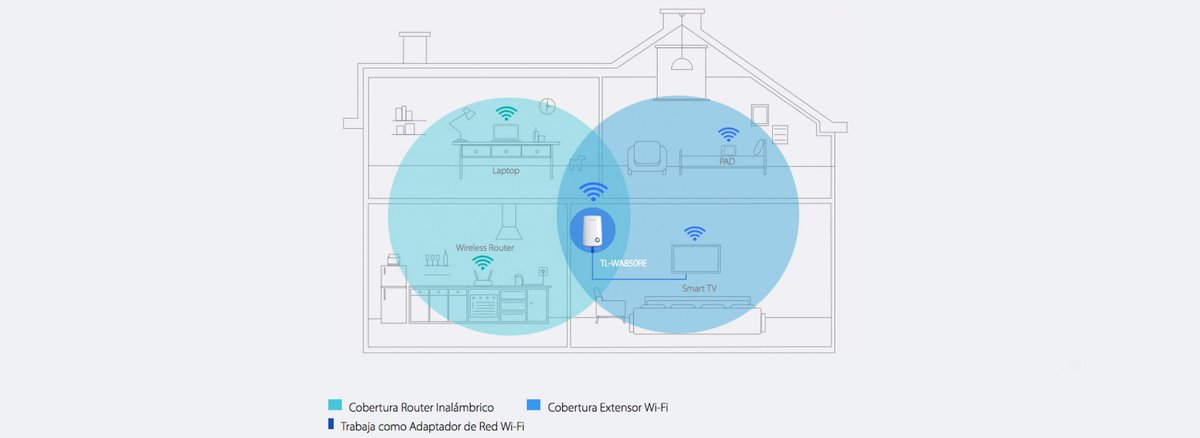
Both the Access Point and the Extender can extend the Wi-Fi signal in two different ways:
360º Omnidirectional: As the name suggests, a Wi-Fi signal that covers 360º.
Sectorial: Allows you to direct the signal to a specific area, improving internet coverage in the area of interest.
Other devices to improve internet coverage at your home:
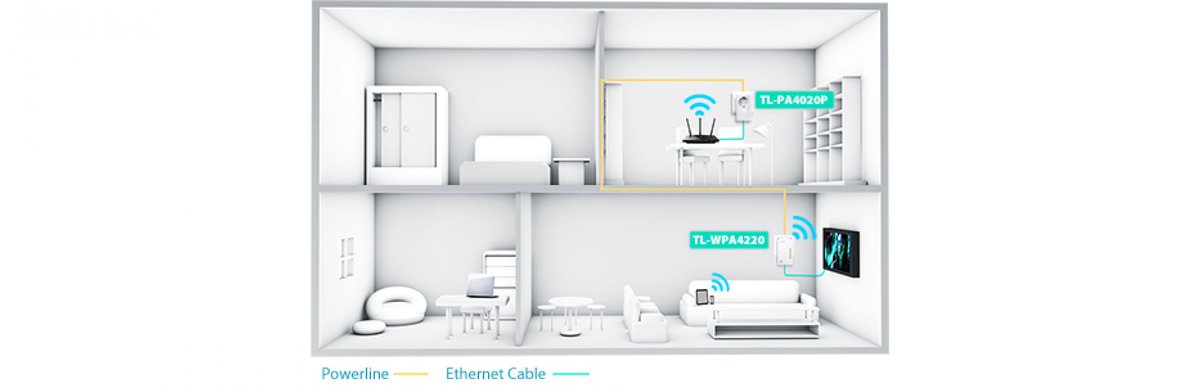
3. PLC: This device extends internet coverage within your home in a simple way, taking advantage of the existing electrical wiring.
Así de fácil, a través de la corriente eléctrica de tu casa. Por ejemplo, si tienes el router en el salón y la señal no llega a una habitación, puedes llevarla a través de los enchufes para tener allí más cobertura.
Ventajas: Es una opción económica y rápida (plug and play) para aumentar cobertura en una habitación. Tan solo hay que configurarlo y enchufarlo.
Inconveniente: Únicamente es posible si la vivienda tiene una sola fase eléctrica.
4. Cableado: Se puede contemplar la opción de cablear la vivienda y conectar todos los dispositivos directamente por cable evitando así, el mínimo de conexiones inalámbricas por wifi (solo teléfonos y tablets, por ejemplo).
Ventajas: Este sistema permite mantener la mejor señal al tener la mayoría de dispositivos – ordenador, televisión, etc. – conectados por cable de red. Es idóneo, sobretodo, para empresas que tienen varias mesas de trabajo y necesitan la máxima capacidad de internet debido a las características de los trabajos que realizan.
Inconvenientes: Tiene un precio más elevado, ya que ha de ser instalado por profesionales. Y en el caso de no contar con conductos escondidos para cables, estos tendrán que quedar a la vista o escondidos en canaletas.
5. Switch o conmutador: Amplia fácilmente tu red de cable, al conectar varios elementos directamente dentro de una red. Es decir, permite tener más equipos conectados directamente por cable. Vendría a ser lo que el ladrón es para la electricidad.
Ventajas: Es muy útil para empresas con varios puestos de trabajo. La señal de internet llega directamente por cable y no pierde señal, como ocurre si se envía por señal digital. No requiere de instalación, es un producto plug & play.
Inconvenientes: Si los dispositivos que quieres conectar al switchno están todos cerca, tendrás que cablear desde el switch hasta el dispositivo que tienes que conectar.

6. Soluciones a medida para áreas wifi: Es la opción más eficaz si se trata de un wifeado profesional para villas de alquiler vacacional, hoteles, apartamentos, locales comerciales, puertos y aeropuertos, etc.; amplios espacios que requieran de una cobertura wifi extensa o/y con múltiples dispositivos conectados a la vez.
En estos casos necesitarás que un equipo técnico profesional se desplace al lugar para realizar una vista previa. Una vez allí, valoran las zonas y espacios a cubrir y realizan un presupuesto adaptado a tus necesidades y las de los usuarios que vayan a usar la red.
Ventajas: Está totalmente optimizadas para la mejor conexión a internet de los usuarios vía wifi.
Desventajas: Tiene un precio más elevado, ya que requiere de más recursos para su correcta instalación y funcionamiento.
Todas estas opciones están disponibles en ib-red y también las puedes encontrar en otras tiendas de electrónica.
Ten en cuenta que algunos, como el extender o el plc, aunque su instalación es sencilla, requieren de una configuración previa. Si eres cliente de una conexión a internet de ib-red, te entregaremos el dispositivo configurado para que tu tan solo tengas que enchufarlo al llegar a tu casa.
En cuanto a las soluciones a medida para áreas wifi, nosotros, en ib-red, siempre, desarrollamos los presupuestos en base al mejor producto de red específico para suministrar grandes caudales de tráfico y número de usuarios concurrentes.
Para una extensión de cobertura wifi de calidad y robusta nuestro equipo prioriza siempre la optimización de recursos y la gestión en remoto de los dispositivos (con su correspondiente mantenimiento técnico de control y de gestión). Así garantizamos la máxima seguridad y una cobertura y calidad de servicio óptima en interior y exterior.
Cualquier consulta que tengas referente a este tipos de dispositivos puedes hacérnosla rellenando el siguiente formulario.


